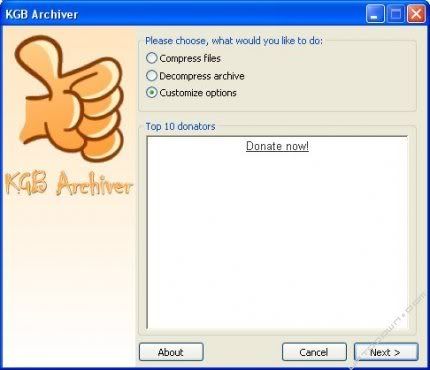
KGB Archiver is the compression tool with an unbelievably high compression rate. Unfortunately, in spite of its powerful compression rate, it has high hardware requirements (I recommend processor with 1,5GHz clock and 256MB of RAM as an essential minimum). One of the advantages of KGB Archiver is also AES-256 encryption which is used to encrypt the archives. This is one of the strongest encryptions known for man.
Friday, December 12, 2008
KGB Archiver
KGB Archiver is the compression tool with an unbelievably high compression rate. Unfortunately, in spite of its powerful compression rate, it has high hardware requirements (I recommend processor with 1,5GHz clock and 256MB of RAM as an essential minimum). One of the advantages of KGB Archiver is also AES-256 encryption which is used to encrypt the archives. This is one of the strongest encryptions known for man.
Virus Heat 4.3 Removal Instuctions
Virus Heat, Virus Heat 4.3, Virus Heat 3.9, is the one of latest and most devastating counterfeit anti-spyware softwares that endangers the world of computers today. From all previous evidences that we collected, we have a good reason to believe that Virus Heat is a new variant of VirusProtect, SpyLocked and SpyCrush spyware family. Virus Heat usually installs itself onto your computer without your permission, through Zlob.Trojan, Virus or fake software. The easiest way to be infected is through installing ActiveX video codecs. Virus Heat then displays fake system alerts or fake security alerts to trick user to buy the paid version of Virus Heat.
Likely error messages for Virus Heat may include, “Your computer is infected with Spyware. Your Security and Privacy are in Danger” or “Spyware programs can steal your credit card numbers and bank information details. The computer can be used sending spam and you may get popups with adult or any other unwanted content” or “System has detected a number of active spyware applications that may impact the performance of your computer. Click the icon to get rid of unwanted spyware by downloading an up-to-date antispyware solution.” Not only does it cause your machine to slow down dramatically, it would also put your privacy and data in risk.
Last of all, before you try anything here, you need to back up the data if possible. This manual removal instruction is free and there would be no guarantee that it works. Good luck!
XP Antivirus 2008 Instructions
XP Antivirus 2008 is the latest counterfeit antispyware that devastates the wolrd wide web. XP Antivirus 2008 usually come up after you installed a video codec that come with Trojan, malware and virus. XP Antivirus 2008 normally generates fake and misleading system popup error messages so end-users will be tricked into purchase XP Antivirus 2008.
It is very important to remove all the components of of the XP Antivirus 2008 and all the malware and trojans that it might have come bundle with (such as zlob.trojan, trojan.vundo and Trojan.Downloader). To effectively remove XP Antivirus 2008, we have created a manual removal instructions which is easy to understand.
Norman Malware Cleaner 2008.12.11: can find and delete different type of Malware
Norman Malware Cleaner 2008.12.11 is a free application created to detect and remove a considerable amount of malware specific to your computer.
However, Norman Malware Cleaner 2008.12.11 does not have access to protection, so only you can use it to solve problems, not to prevent them.
To use Norman Malware Cleaner 2008.12.11 is absolutely advisable to do so in safe mode, and that its effectiveness will be much higher. The program can stop and eliminate infected processes, eliminate infections in disk, system files or ActiveX components, you can find and remove rootkits, correct and restore values of the Windows Registry, and remove all the inserts that the malware has left in our computer .
Multi Virus Cleaner 2008 8.6.0 is an anti-virus that can detect and remove viruses and worms major
If you sensed that the desestabilidad your system is caused by a virus or anything threatening, Multi Virus Cleaner 2008 8.6.0 is the anti-virus you need.
Thanks to this free application, you can detect and delete all malicious viruses, worms, Trojans and dialers that may have on your PC.
MacBook Air has a Special USB Port for "Super Drive"
Very few of us actually have to deal with external USB DVD burners since even the slimmest laptops sold in America have an optical drive. Exceptions are UMPCs, imported tiny Japanese sub-notebooks, and now Apple MacBook Air. Owners of the former two devices are already accustomed to compromises. On the other hand, Mac folks have been bashing Apple about the Air omission of a built-in DVD writer and limiting them to one and only optical drive option that won't even work on other MacBooks, let alone PCs.
It looks like Apple has a good technical reason. In order for a USB burner to operate completely bus-powered, Apple had to ask Intel to design a motherboard whose USB port exceeds normal parameters to supply more power (500mA). Then Apple had to come up with a special SuperDrive that can tolerate the electrical load from this high-powered port. The $99 slot-loading optical drive therefore can't work with other machines because of the power requirement.
Labels:
macbook air,
MacBook Air 2008,
Super Drive,
USB Port
Subscribe to:
Comments (Atom)